Zhipu AI Open-Sources AutoGLM for Automated Mobile Operations

Zhipu AI has open-sourced AutoGLM, a framework designed to enable automated, intelligent operations on mobile devices. The release includes the core model, code, a functional framework, and a demonstration package. AutoGLM operates under an MIT license and provides a comprehensive resource package.
The package contains a trained core model, a capability framework and toolchain for phone use, and a ready-to-run demo supporting over 50 high-frequency Chinese applications. It also includes an adaptation layer and example project for Android, along with documentation and a getting-started guide.
Phone Agent Framework
Phone Agent, built on AutoGLM, functions as a mobile intelligent assistant. It uses multimodal understanding to interpret mobile screen content and assists users by automating operations. The system controls devices via Android Debug Bridge (ADB), employs a visual language model for screen perception, and integrates intelligent planning capabilities to generate and execute operational workflows.
Users can describe their needs in natural language, such as "Open Xiaohongshu to search for food," and Phone Agent will parse the intent, understand the current interface, plan the next action, and complete the task. The system incorporates a sensitive operation confirmation mechanism and supports manual intervention for scenarios like logins or verification codes. It also offers remote ADB debugging, allowing flexible control and development over Wi-Fi or network connections.
Model Availability
Two versions of the AutoGLM-Phone-9B model are available for download:
AutoGLM-Phone-9B: Designed for Chinese-only usage.
AutoGLM-Phone-9B-Multilingual: Covers 99% of typical phone scenarios, including English processing.
Both models are accessible via Hugging Face and ModelScope. The models are designed for deployment on both mobile and backend systems.
System Requirements and Setup
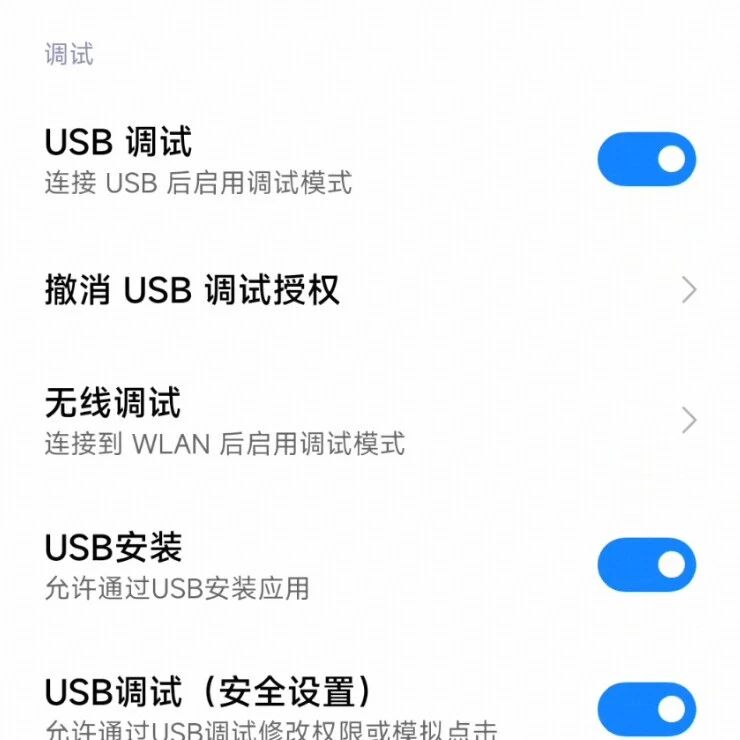
To use AutoGLM, users need Python 3.10 or higher and ADB (Android Debug Bridge). ADB requires installation and configuration of environment variables on macOS or Windows. An Android 7.0+ device or emulator with Developer Options and USB Debugging enabled is also necessary. Additionally, the ADB Keyboard application must be installed and activated on the Android device for text input.
Deployment involves installing project dependencies via pip and connecting the phone to a computer using a data-transfer cable. The adb devices command verifies the connection.
Model Deployment and Operation
Users can download either the Chinese-exclusive or the bilingual model. The system recommends using vLLM for model execution, which can be initiated with a command-line script. This script configures the model server with parameters for max-model-len, limit-mm-per-prompt, and mm_processor_kwargs. Upon successful startup, the server runs on http://0.0.0.0:8000.
Users can interact with the Phone Agent through a command-line interface or by integrating it into Python code. Command-line interactions allow users to issue commands in natural language, such as "Open Meituan, search for the highest-rated hotpot restaurant nearby." English commands are also supported. The system can list controlled applications using python main.py --list-apps. For programmatic control, a PhoneAgent object can be instantiated and used to run tasks.
Remote Debugging and Customization
Phone Agent supports remote ADB debugging, enabling device control over Wi-Fi without a USB connection. This feature requires enabling wireless debugging on the phone and ensuring both the phone and computer are on the same Wi-Fi network. Standard ADB commands can then be used to connect and manage devices remotely. The Python API also provides functionalities for managing ADB connections, including connecting to remote devices, listing connected devices, and enabling TCP/IP on USB devices.
The system supports operations such as launching applications, tapping, typing, swiping, navigating, and requesting manual intervention for sensitive actions like logins or verification codes. Users can implement custom callbacks for sensitive operation confirmation and manual intervention.
Phone Agent supports over 50 mainstream Chinese applications across categories including social communication, e-commerce, food delivery, travel, video entertainment, music, life services, and content communities. A complete list of supported applications can be viewed by running python main.py --list-apps.
Additional usage examples and details for secondary development, including running tests, are available in the project's GitHub repository.